
You can set up alerts to be notified when certain metrics reach a predefined value. Food intake, water intake, weight, viability… Here’s how to set them up.

In the app, click on the arrow next to the profile name in the top right-hand corner, then click on ‘Alert management’. Select the flcoks for which you wish to set up new alerts or edit existing ones.
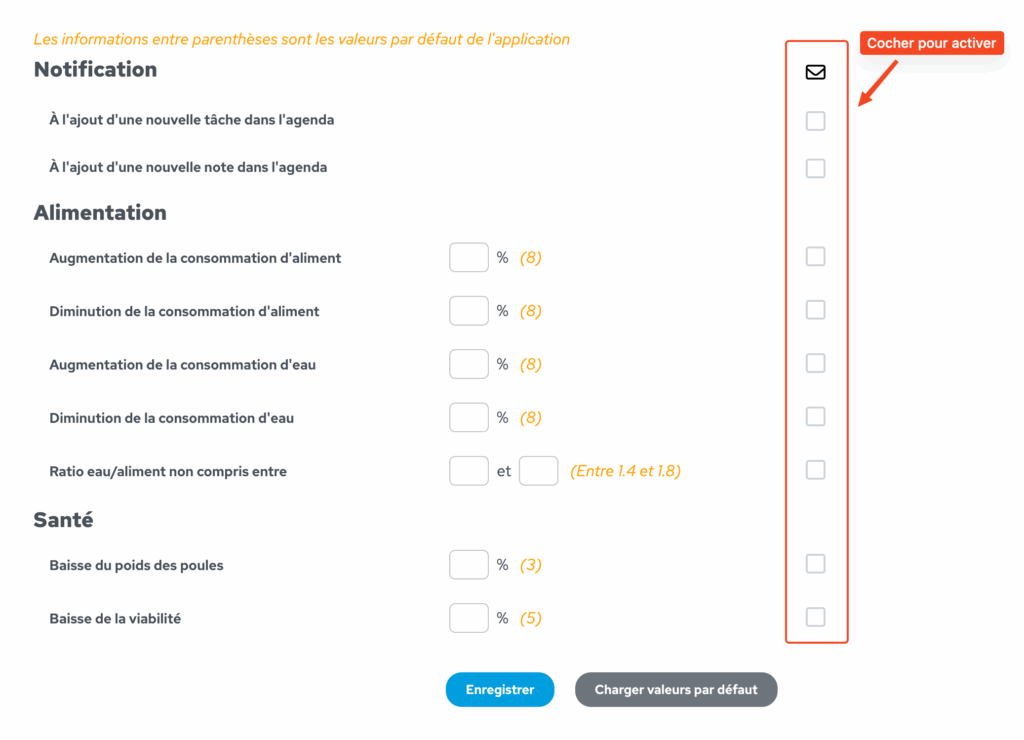
Tick the boxes in the right-hand column to enable the desired alerts. By default, the alerts are set to the values shown in orange. E.g.: If the relevant box is ticked, the farmer receives an alert as soon as feed consumption increases by 8% compared with the last entry. You can customise this figure by entering the value of your choice in the % box.
Alerts configured in this way trigger the creation of a notification, the sending of an email and the creation of an event in the batch’s calendar.